
FastAPI auto generated load testing with K6
Explore k6 load testing with FastAPI auto generated openapi spec.

Overview
K6.io is a load testing tool I’ve started using in some projects at work with very good results. Searching to speed up the test creation process while reading k6 blog and docs ended up discovering this post and remembered FastAPI generates the Openapi spec from routes.
Fastapi is a high-performance web framework for building APIs with Python. Amazing tool and community, just give it a try.
k6 was just acquired by Grafana so expect larger adoption in the cloud native ecosystem.
What are we doing here?
-
Launch a FastAPI sample app with a prebuilt docker image form the author of the framework.
-
Create a k6 script from the openapi spec generated by FastAPI
-
Execute a k6 load test that came from another dimension and smell the magic.
Requirements
No packages requirements if you already have docker and docker-compose. Create these two files in your local directory (JFYI: I use linux and bash):
- docker-compose.yaml
version: '3.8'

services:

  fastapi:
    image: tiangolo/uvicorn-gunicorn-fastapi:python3.7
    volumes:
      - ${PWD}/main.py:/app/main.py
    command: /start-reload.sh
    ports:
      - 80:80

  openapi-cli:
    image: openapitools/openapi-generator-cli
    volumes:
      - ${PWD}:/ci
    command: generate -i http://fastapi/openapi.json -g k6 -o /ci/k6/ --skip-validate-spec

  k6:
    image: loadimpact/k6
    volumes:
      - ${PWD}:/ci
command: run /ci/k6/script.js- main.py (example from FastAPI docs)
from typing import Optional

from fastapi import FastAPI, Header, HTTPException
from pydantic import BaseModel

fake_secret_token = "coneofsilence"

fake_db = {
    "foo": {"id": "foo", "title": "Foo", "description": "There goes my hero"},
    "bar": {"id": "bar", "title": "Bar", "description": "The bartenders"},
}

app = FastAPI()


class Item(BaseModel):
    id: str
    title: str
    description: Optional[str] = None


@app.get("/items/{item_id}", response_model=Item)
async def read_main(item_id: str, x_token: str = Header(...)):
    if x_token != fake_secret_token:
        raise HTTPException(status_code=400, detail="Invalid X-Token header")
    if item_id not in fake_db:
        raise HTTPException(status_code=404, detail="Item not found")
    return fake_db[item_id]


@app.post("/items/", response_model=Item)
async def create_item(item: Item, x_token: str = Header(...)):
    if x_token != fake_secret_token:
        raise HTTPException(status_code=400, detail="Invalid X-Token header")
    if item.id in fake_db:
        raise HTTPException(status_code=400, detail="Item already exists")
    fake_db[item.id] = item
    return item
Start FastAPI app
docker-compose up fastapiLaunch the python app and check the auto-generated docs at http://localhost/docs
Auto generate K6 script from Openapi spec
docker-compose run -u ${UID} --rm openapi-cliThe script need to be updated/tuned after being generated. Check again the recomendations by k6 in the linked post. This is a slightly updated version of the script.
Copy this file to ${PWD}/ci/k6/script.js or check the required changes:
- Added xToken
- Update the body.id string to be random in the new items endpoint
- Stringify the request body
The fastapi app is running in reload mode if you need to change/test something.
import http from "k6/http";
import { group, check, sleep } from "k6";
import { randomString } from "https://jslib.k6.io/k6-utils/1.1.0/index.js";

const BASE_URL = "http://fastapi";
const SLEEP_DURATION = 0.1;

let xToken = "coneofsilence";
let randomName = randomString(8);

export default function() {
    group("/items/", () => {
        let url = BASE_URL + `/items/`;
        let body = {"id": `${randomName}`, "title": "string", "description": "string"};
        let params = {headers: {"Content-Type": "application/json", "x-token": `${xToken}`, "Accept": "application/json"}};
        console.log(JSON.stringify(body));
        let request = http.post(url, JSON.stringify(body), params);
        check(request, {
            "Successful Response": (r) => r.status === 200
        });
        sleep(SLEEP_DURATION);
    });
    group("/items/{item_id}", () => {
        let itemId = `${randomName}`;
        let url = BASE_URL + `/items/${itemId}`;
        let params = {headers: {"x-token": `${xToken}`, "Accept": "application/json"}};
        let request = http.get(url, params);
        check(request, {
            "Successful Response": (r) => r.status === 200
        });
        sleep(SLEEP_DURATION);
    });
Execute K6 script
docker-compose run --rm k6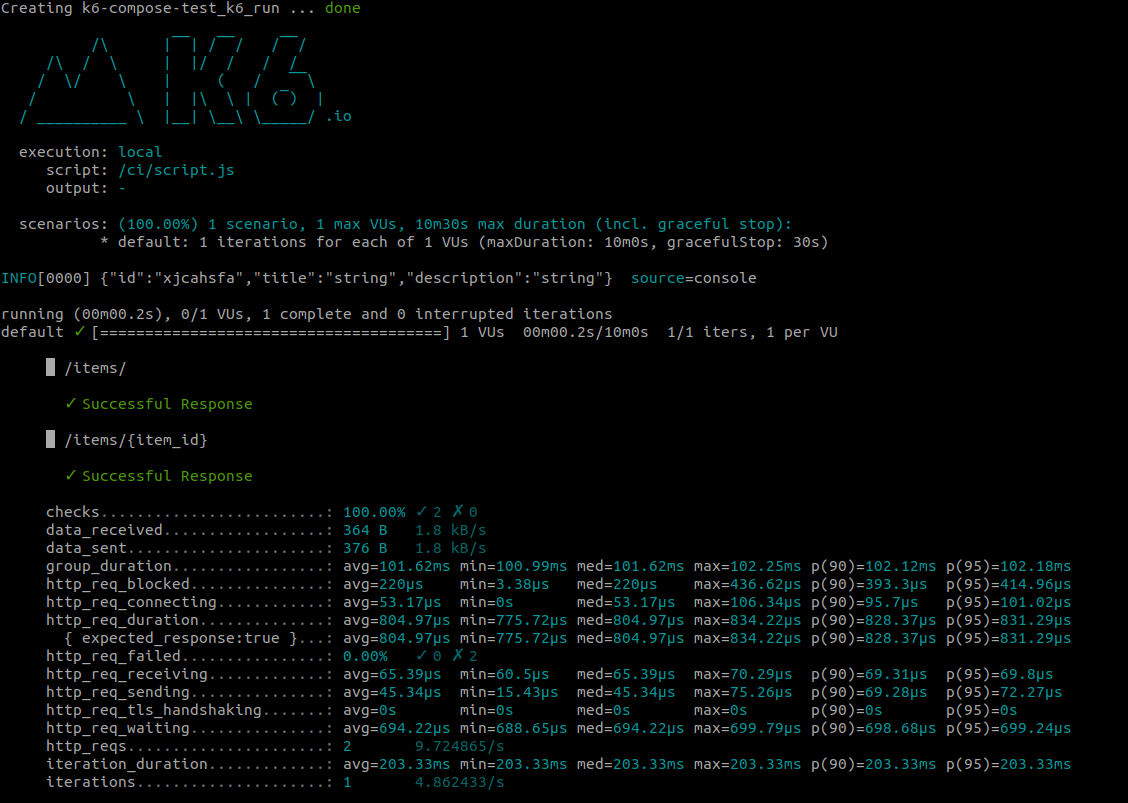
docker-compose down