
Drupal deployments in AWS ECS with AWS Copilot
Example of a stateful application deployment in ECS Fargate using AWS Copilot CLI from a docker-compose setup
Copilot is a new released tool from AWS to allow developers deploying containerized applications in AWS Fargate and aditional resources like s3 buckets easily.
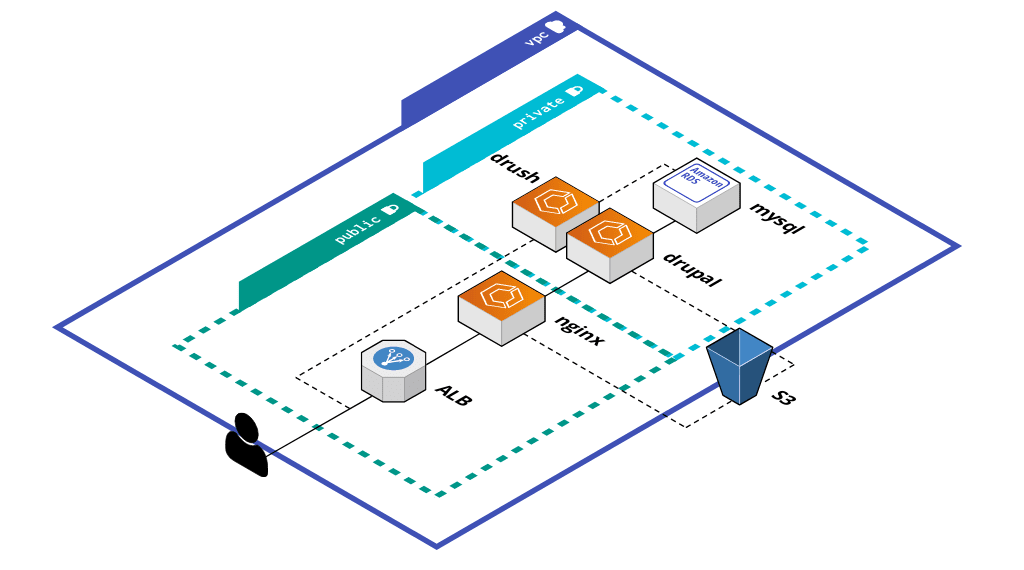
In this tutorial I will deploy a complete drupal application with this architecture using copilot:
TL;DR
Copilot is a great cli but still in early stages. I dont want my dev teams to debug cloudformation stacks neither grant them permissions in prod accounts.
What did I miss from copilot?
- More use cases for jobs/tasks: event-scheduled tasks or let reusing service manifest specs (credentials, task roles, etc.) in a simple way.
- Cross accounts functionalities: being able to promote artifacts from develop to production accounts and follow good AWS practices.
- Works in conjunction with another tools like AWS CDK or Hashicorp terraform.
The full sample code is in github (v1.1.0 branch)
Motivation
- Test new cloud tools to accelerate development.
- Learn about Cloudformation and look for alternatives to our current deployment workflows with terraform.
Requisites
- Some knowledge about drupal or similar stacks with docker containers.
- AWS account with a s3 bucket to store drupal static files and mysql backups. Remember to secure your bucket access, for instance: https://docs.aws.amazon.com/AmazonS3/latest/dev/example-bucket-policies.html#example-bucket-policies-use-case-3
- Install copilot: https://aws.github.io/copilot-cli/docs/getting-started/install/
- A Dockerfile and some code
1. Setup Drupal
The drupal aplication is started in localhost from a docker-compose.yaml with the dockerhub images of nginx, drupal, mysql and minio extended with the gomplate template renderer to configure the services at runtime. This will allow to use drush commands like database migrations and manage drupal without access to drupal itself. There is an open issue in aws/containers-roadmap you should follow if using ECS/Copilot with stacks like Drupal, Django, etc. who needs a CLI for administration tasks.
Another use case of gomplate that is not covered is the ability to directly use AWS secret manager or parameters store among others inside containers.
After Starting a new drupal project installing the umami demonstration drupal project I configured the S3FS drupal module to use a S3 bucket instead local volumes. Backup your database, upload your static files to your secured S3 and you’re ready to go.
2. Create the Copilot application
The first step is to specify which AWS CLI profile to use. Configure your AWS CLI credentials file and set the correct profile, otherwise the default profile is used:
export AWS_DEFAULT_PROFILE=kamminNext create the first app resources by running:
copilot app init drupalCopilot will create the required AWS Identity and Access Management roles to manage the infrastructure and the sub-directory copilot/ for the required manifests.

3. Create the first AWS environment
A environment is the common shared resources used by the services of the app consisting of a new or existing VPC with public and private subnets across two availability zones, IAM roles, an ECS cluster and a Cloud Map Namespace for service discovery.
copilot env init --app drupal --name dev --profile kammin --default-config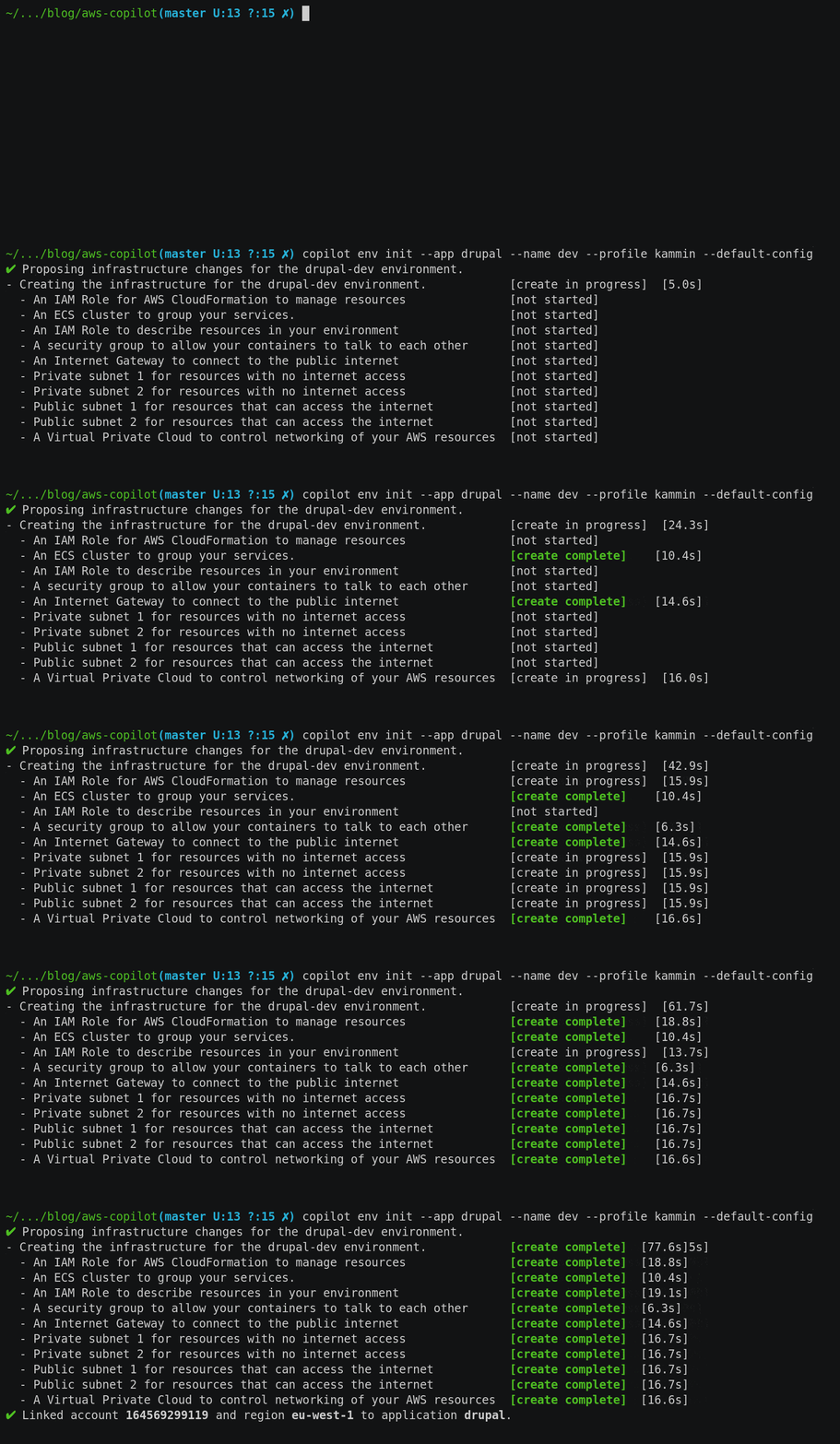
3.1 Create a Drupal service
The Copilot “Backend Service” will create a ECS service from the selected Dockerfile in the private subnet of the VPC only accessible from other services. If the manifest already exists is not overwriting but the command have to be launched to create the ECR repository and the required values in AWS Parameter Store.
copilot svc init --name drupal --svc-type "Backend Service" \
                 --port 9000 --dockerfile ./docker-images/drupal/Dockerfile
The build options can be extended to use build context, build args or a target in a multibuild stage to name a few.
Copilot comes with some additional AWS resources creation in the cli (more to come yet). A s3 bucket attached to drupal is created with this command to save Drupal static files:
copilot storage init --name static-files --storage-type S3 --workload drupalIn the created file under copilot/drupal/addons/static-files.yaml I will manually edit the managed policy to grant acces to the backend service to another s3 bucket to sync files from.
To create additional AWS resources check this guide . The custom cloudformation template needs a IAM ManagedPolicy with the generated ARN in the Outputs to inject the value to the attached service.
There is also a sample RDS CloudFormation template in the repository with fixed values for username and password. Do not reuse this example in producction workloads. You can use secrets following the documentation .
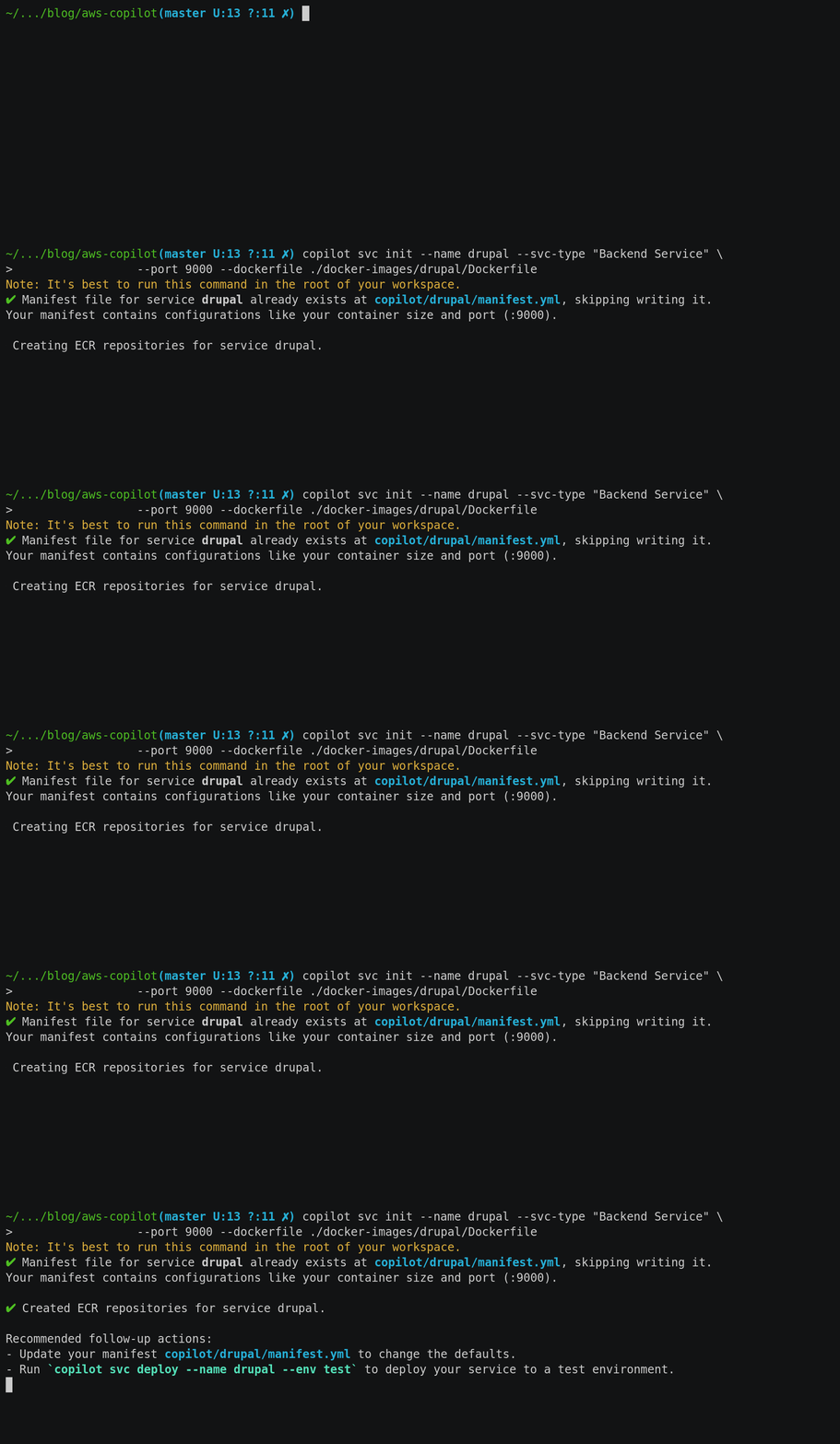
After customizing our resources deploy the backend service, the s3 bucket and the RDS database with this command:
$ copilot svc deploy --name drupal --env dev
Environment dev is already on the latest version v1.1.0, skip upgrade.
Sending build context to Docker daemon  226.1MB
Step 1/17 : FROM drupal:9.0-fpm-alpine
 ---> fec11100cd3e
Step 2/17 : COPY --from=hairyhenderson/gomplate:v3.8.0-slim /gomplate /bin/gomplate
 ---> Using cache
 ---> 4955d04a4757
Step 3/17 : RUN apk --update add --no-cache fcgi mysql-client bash
 ---> Using cache
 ---> 38bcf8c995fd
Step 4/17 : RUN curl -o /usr/local/bin/php-fpm-healthcheck https://raw.githubusercontent.com/renatomefi/php-fpm-healthcheck/master/php-fpm-healthcheck &&    chmod +x /usr/local/bin/php-fpm-healthcheck
 ---> Using cache
 ---> e6d257728fb1
Step 5/17 : COPY docker-images/drupal/conf/php-fpm-status.conf /usr/local/etc/php-fpm.d/status.conf
 ---> Using cache
 ---> 7b0128d021d8
Step 6/17 : COPY docker-images/drupal/conf/php.ini /usr/local/etc/php/php.ini
 ---> Using cache
 ---> 32c08698cb9c
Step 7/17 : COPY docker-images/drupal/conf/drush.yml /root/.drush/drush.yml
 ---> Using cache
 ---> d869a642f327
Step 8/17 : COPY docker-images/drupal/conf/alias.site.yml /root/.drush/sites/alias.site.yml
 ---> Using cache
 ---> ee2222b5a4c9
Step 9/17 : HEALTHCHECK --interval=5s --timeout=10s --start-period=5s --retries=3 CMD [ "php-fpm-healthcheck" ]
 ---> Using cache
 ---> c32abc7ba4ba
Step 10/17 : COPY docker-images/drupal/assets/ /assets
 ---> 91876c727481
Step 11/17 : COPY src/ /var/www/html/
 ---> 3f5aca81bb81
Step 12/17 : RUN composer install
 ---> Running in c8b24abc10e3
Loading composer repositories with package information
Installing dependencies (including require-dev) from lock file
Nothing to install or update
Package doctrine/reflection is abandoned, you should avoid using it. Use roave/better-reflection instead.
Generating autoload files
28 packages you are using are looking for funding.
Use the `composer fund` command to find out more!
  * Homepage: https://www.drupal.org/project/drupal
  * Support:
    * docs: https://www.drupal.org/docs/user_guide/en/index.html
    * chat: https://www.drupal.org/node/314178
Removing intermediate container c8b24abc10e3
 ---> 67093b83ec33
Step 13/17 : RUN chown -R www-data:www-data web/sites/default
 ---> Running in eb7f359f2b59
Removing intermediate container eb7f359f2b59
 ---> 6143b056e60b
Step 14/17 : RUN ln -s /var/www/html/vendor/drush/drush/drush /usr/local/bin/drush
 ---> Running in 9a25817f3fb6
Removing intermediate container 9a25817f3fb6
 ---> d672dfea1318
Step 15/17 : EXPOSE 9000
 ---> Running in e8baf8c678bb
Removing intermediate container e8baf8c678bb
 ---> 16ea15d8308f
Step 16/17 : ENTRYPOINT ["/bin/bash","/assets/bin/docker-entrypoint.sh"]
 ---> Running in 8be54fcc4b0d
Removing intermediate container 8be54fcc4b0d
 ---> ae9504fc024c
Step 17/17 : CMD ["php-fpm","--fpm-config","/usr/local/etc/php-fpm.conf","-c","/usr/local/etc/php/php.ini"]
 ---> Running in f57fa9581629
Removing intermediate container f57fa9581629
 ---> 9625be037456
Successfully built 9625be037456
Successfully tagged 164569299119.dkr.ecr.eu-west-1.amazonaws.com/drupal/drupal:9c587264
WARNING! Your password will be stored unencrypted in /home/steran/.docker/config.json.
Configure a credential helper to remove this warning. See
https://docs.docker.com/engine/reference/commandline/login/#credentials-store

Login Succeeded
The push refers to repository [164569299119.dkr.ecr.eu-west-1.amazonaws.com/drupal/drupal]
c66c9b92c834: Pushed
0b89619b8195: Pushed
da92061480e6: Pushed
9deb8b49c259: Pushed
5141c71b26ca: Pushed
d549a5c3cc23: Pushed
51391cc9f0d9: Pushed
7c3559086a98: Pushed
bd2706928b8b: Pushed
85f0bd8fd97d: Pushed
f44ba2e6e89c: Pushed
52324637408c: Pushed
9c3da75c664e: Pushed
739fdd2386a4: Pushed
f43c6165c459: Pushed
7b8497bfba0f: Pushed
4d94a9b9e286: Pushed
79d9a1461370: Pushed
98556f763a25: Pushed
add721aa4e5c: Pushed
44fbeaef347a: Pushed
bc11fe48042d: Pushed
24e52497c24f: Pushed
86d905c1f58e: Pushed
22573737ba76: Pushed
777b2c648970: Pushed
9c587264: digest: sha256:5f4a4b9ff3cac43f40be614206f8d55e6fa563965ced94b02449eff143b3f94b size: 5752

✔ Deployed drupal, its service discovery endpoint is drupal.drupal.local:9000.
3.2 Create nginx service
The nginx webserver will be accessible from internet using an Application Load Balancer.
copilot svc init --name nginx --svc-type "Load Balanced Web Service" \
                 --port 80 --dockerfile ./docker-images/nginx/Dockerfile
This service will also need access to the static files in the S3 bucket. I will attach the created task role in the drupal service with access to S3 to the nginx service using a cloud formation file in the addons directory.
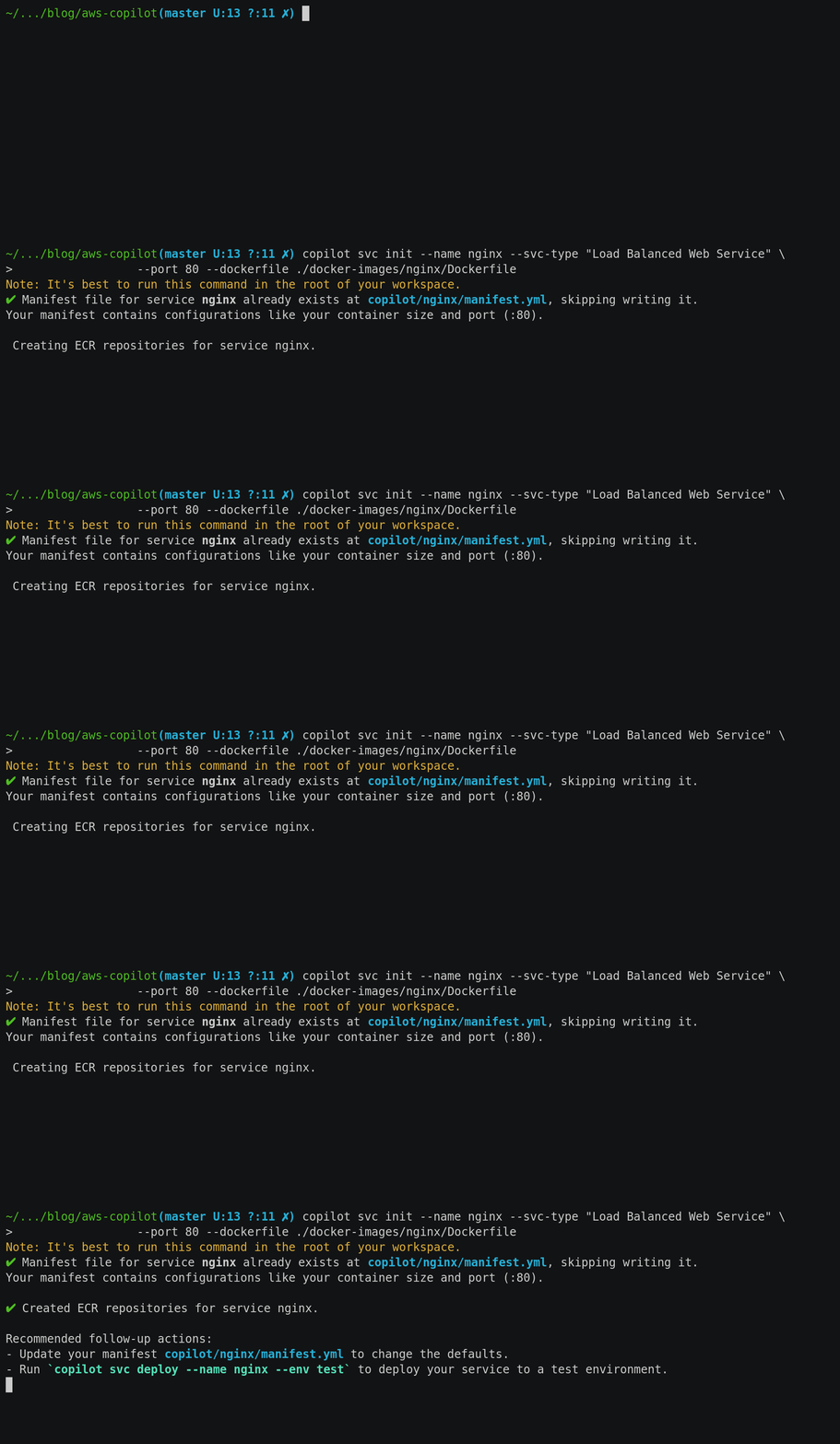
Deploy the webserver by running:
$ copilot svc deploy --name nginx --env dev
Environment dev is already on the latest version v1.1.0, skip upgrade.
Sending build context to Docker daemon  226.1MB
Step 1/7 : FROM kammin/copilot-drupal as src
 ---> b86a80e9e240
Step 2/7 : FROM nginx:1.19.6
 ---> ae2feff98a0c
Step 3/7 : COPY --from=hairyhenderson/gomplate:v3.8.0-slim /gomplate /bin/gomplate
 ---> Using cache
 ---> 47fed42c1182
Step 4/7 : COPY docker-images/nginx/assets/ /assets
 ---> Using cache
 ---> 850dfebe524a
Step 5/7 : COPY --from=src /var/www/html/web /var/www/html/web
 ---> Using cache
 ---> aa2a289596db
Step 6/7 : ENTRYPOINT ["/bin/bash","/assets/bin/docker-entrypoint.sh"]
 ---> Using cache
 ---> f50a5fd9d908
Step 7/7 : CMD ["nginx", "-g", "daemon off;"]
 ---> Using cache
 ---> 8970911cf339
Successfully built 8970911cf339
Successfully tagged 164569299119.dkr.ecr.eu-west-1.amazonaws.com/drupal/nginx:9c587264
WARNING! Your password will be stored unencrypted in /home/steran/.docker/config.json.
Configure a credential helper to remove this warning. See
https://docs.docker.com/engine/reference/commandline/login/#credentials-store

Login Succeeded
The push refers to repository [164569299119.dkr.ecr.eu-west-1.amazonaws.com/drupal/nginx]
9d5ab819b891: Pushed
93e8457b8e86: Pushed
02c85958d14e: Pushed
4eaf0ea085df: Pushed
2c7498eef94a: Pushed
7d2b207c2679: Pushed
5c4e5adc71a8: Pushed
87c8a1d8f54f: Pushed
9c587264: digest: sha256:8b20830a31c3943e130762bf92c388556c1e6ca1681867da2344372b44e538a3 size: 1993


✔ Deployed nginx, you can access it at http://drupa-publi-kxncfk7jyr9z-339478161.eu-west-1.elb.amazonaws.com/.
3.3 Sync static files to s3 and database to AWS RDS
To run the migration script I will parse the info provided by ‘copilot svc show’
S3_BUCKET=$(copilot svc show --name drupal --json | jq -r '.variables[] | select(.name=="S3_BUCKET") | .value')

S3_BUCKET_BACKUP=$(copilot svc show --name drupal --json | jq -r '.variables[] | select(.name=="S3_BUCKET_BACKUP") | .value')

MYSQL_HOST=$(copilot svc show --name drupal --json | jq -r '.variables[] | select(.name=="MYSQL_HOST") | .value')

TASK_DEFINITION=$(copilot svc status --name drupal --json | jq -r .Service.taskDefinition)

TASK_ROLE=$(aws ecs describe-task-definition --task-definition ${TASK_DEFINITION} --query 'taskDefinition.taskRoleArn' --output text | cut -d '/' -f2)

copilot task run -n drupalmigrate --app drupal --env dev --follow \
  --task-role ${TASK_ROLE} \
  --dockerfile ./docker-images/drush/Dockerfile \
  --env-vars S3_BUCKET=${S3_BUCKET},S3_BUCKET_BACKUP=${S3_BUCKET_BACKUP},S3_REGION=eu-west-1,MYSQL_HOST=${MYSQL_HOST}

✔ Successfully provisioned task resources.

Sending build context to Docker daemon  4.608kB
Step 1/4 : FROM kammin/copilot-drupal
 ---> b86a80e9e240
Step 2/4 : RUN apk --update add --no-cache aws-cli
 ---> Using cache
 ---> 230df5257330
Step 3/4 : COPY assets/ /assets
 ---> Using cache
 ---> ba88af3c3d76
Step 4/4 : CMD ["/assets/scripts/db_migrate.sh"]
 ---> Using cache
 ---> d857db40fc4c
Successfully built d857db40fc4c
Successfully tagged 164569299119.dkr.ecr.eu-west-1.amazonaws.com/copilot-drupalmigrate:latest
WARNING! Your password will be stored unencrypted in /home/steran/.docker/config.json.
Configure a credential helper to remove this warning. See
https://docs.docker.com/engine/reference/commandline/login/#credentials-store

Login Succeeded
The push refers to repository [164569299119.dkr.ecr.eu-west-1.amazonaws.com/copilot-drupalmigrate]
7a3251d8fb97: Layer already exists
94ae59e3f0e1: Layer already exists
06f2e1371265: Layer already exists
f5a9a0202fd7: Layer already exists
8e1fc8982109: Layer already exists
4f7485f057d9: Layer already exists
79ac02142b14: Layer already exists
62d90a23a5d9: Layer already exists
d933dd23c7bf: Layer already exists
1fed3837e243: Layer already exists
bd2706928b8b: Layer already exists
85f0bd8fd97d: Layer already exists
f44ba2e6e89c: Layer already exists
52324637408c: Layer already exists
9c3da75c664e: Layer already exists
739fdd2386a4: Layer already exists
f43c6165c459: Layer already exists
7b8497bfba0f: Layer already exists
4d94a9b9e286: Layer already exists
79d9a1461370: Layer already exists
98556f763a25: Layer already exists
add721aa4e5c: Layer already exists
44fbeaef347a: Layer already exists
bc11fe48042d: Layer already exists
24e52497c24f: Layer already exists
86d905c1f58e: Layer already exists
22573737ba76: Layer already exists
777b2c648970: Layer already exists
latest: digest: sha256:b5f70f1ed70e2657e40833916d389876abf0bc954626f228f87b1574a8bb0b1d size: 6171
✔ Successfully updated image to task.

✔ Task drupalmigrate is running.

copilot-task/drupalmigrat + source /assets/bin/entrypoint.functions
copilot-task/drupalmigrat + process_templates
copilot-task/drupalmigrat + gomplate -f /assets/templates/settings.local.php.tmpl -o /var/www/html/web/sites/default/settings.local.php
copilot-task/drupalmigrat + gomplate -f /assets/templates/default.settings.php.tmpl -o /var/www/html/web/sites/default/settings.php
copilot-task/drupalmigrat + exec /assets/scripts/db_migrate.sh
copy: s3://tetestetestetes-drupal-s3fs/s3fs-public/crema-catalana-umami.jpg to s3://drupal-dev-drupal-static-files/s3fs-public/crema-catalana-umami.jpg
copy: s3://tetestetestetes-drupal-s3fs/s3fs-public/chili-sauce-umami.jpg to s3://drupal-dev-drupal-static-files/s3fs-public/chili-sauce-umami.jpg
....
copy: s3://tetestetestetes-drupal-s3fs/s3fs-public/vegan-chocolate-nut-brownies.jpg to s3://drupal-dev-drupal-static-files/s3fs-public/vegan-chocolate-nut-brownies.jpg
copy: s3://tetestetestetes-drupal-s3fs/s3fs-public/watercress-soup-umami.jpg to s3://drupal-dev-drupal-static-files/s3fs-public/watercress-soup-umami.jpg
copy: s3://tetestetestetes-drupal-s3fs/s3fs-public/styles/medium_3_2_2x/public/watercress-soup-umami.jpg to s3://drupal-dev-drupal-static-files/s3fs-public/styles/medium_3_2_2x/public/watercress-soup-umami.jpg
copy: s3://tetestetestetes-drupal-s3fs/s3fs-public/translations/.htaccess to s3://drupal-dev-drupal-static-files/s3fs-public/translations/.htaccess
download: s3://tetestetestetes-drupal-s3fs/mysql-backups/drupal_umami_202101112017.sql to ./mysql_dump.sql
copilot-task/drupalmigrat  [info] Executing: command -v mysql [0.79 sec, 9.52 MB]
copilot-task/drupalmigrat  [info] Executing: mysql --defaults-file=/tmp/drush_lidJBj --database=drupal --host=dr1e5h2wuan1rsf.cqrlqadfjarc.eu-west-1.rds.amazonaws.com --port=3306 --silent -A < /opt/drupal/mysql_dump.sql [0.89 sec, 9.64 MB]
Task has stopped.
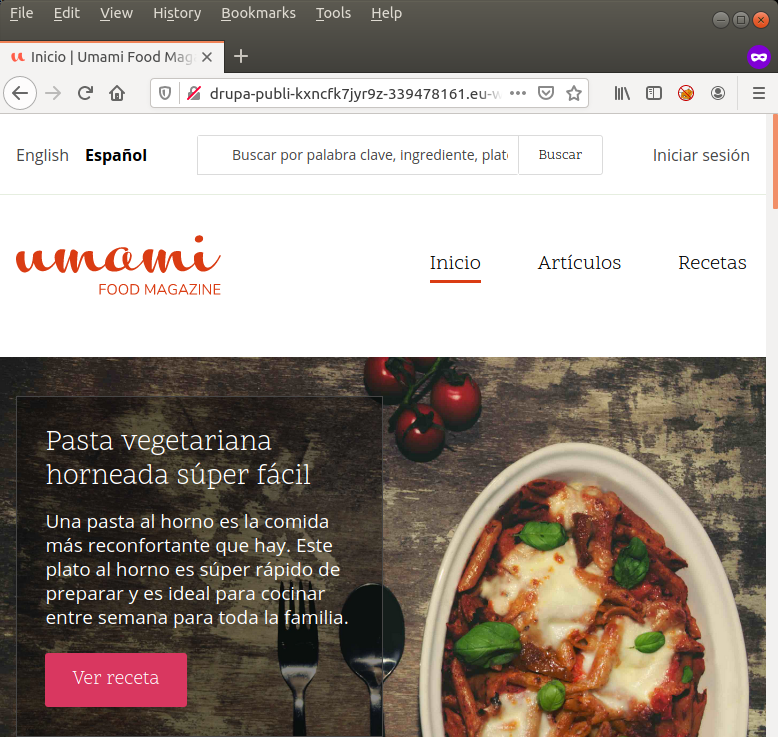
Check website
After the sync job the site is up.
Delete app
$ copilot app delete --yes --name drupal
✔ Deleted service drupal from environment dev.
✔ Deleted resources of service drupal from application drupal.
✔ Deleted service drupal from application drupal.
✔ Deleted service nginx from environment dev.
✔ Deleted resources of service nginx from application drupal.
✔ Deleted service nginx from application drupal.
✔ Deleted environment dev from application drupal.
✔ Cleaned up deployment resources.
✔ Deleted application resources.
✔ Deleted application configuration.
✔ Deleted local .workspace file.
References:
- https://aws.github.io/copilot-cli/
- https://maartenbruntink.nl/blog/2020/08/16/deploying-containers-with-the-aws-copilot-cli-part-1/
- https://github.com/drupalwxt
- https://nathanpeck.com/speeding-up-amazon-ecs-container-deployments/
- https://youtu.be/WOhm_YgrGwY